


 Monetization
Backup Strategies That Hold Up in Production
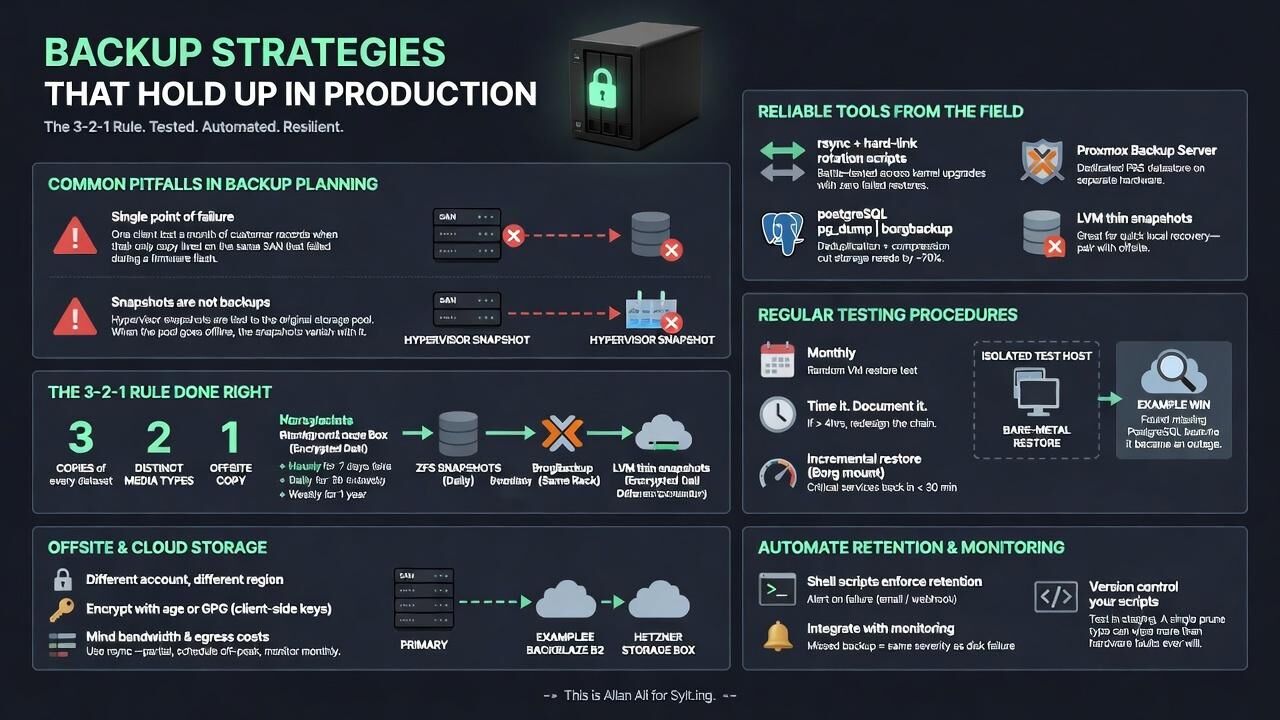
Backup Strategies That Hold Up in Production
Common Pitfalls in Backup Planning
Most backup schemes collapse under real load because teams treat them as an afterthought rather than core infrastructure. Six months back a client lost an entire month of customer records when their only copy sat on the same SAN that suffered controller failure during a firmware flash. The plan looked solid on paper yet ignored the single point of failure right in front of them.
Another frequent mistake is assuming snapshots alone qualify as backups. Hypervisor snapshots are convenient for quick rollbacks but they remain tied to the original storage pool. When that pool goes offline the snapshots vanish with it. Production teams learn this the hard way after every major outage.
Implementing the 3-2-1 Rule Properly
The 3-2-1 rule remains the baseline that actually survives incidents when executed without shortcuts. Maintain three copies of every dataset across two distinct media types with at least one copy stored offsite. In practice this means daily ZFS snapshots on the primary host, weekly BorgBackup archives pushed to a separate Proxmox node in the same rack, and an encrypted daily transfer to a Hetzner Storage Box located in a different country.
Never rely on a single vendor for all three copies. Mixing local spinning disks with object storage from Backblaze B2 adds resilience against both hardware faults and provider outages. Retention policies should keep hourly snapshots for seven days, daily copies for thirty days, and weekly archives for a full year to satisfy most audit requirements without ballooning storage costs.
Reliable Tools from the Field
Skip enterprise dashboards that require constant licensing fees. rsync combined with hard-link rotation scripts has protected Linux fleets through multiple kernel upgrades without a single failed restore. For PostgreSQL workloads pipe pg_dump output directly into BorgBackup; the deduplication and compression routinely cut storage needs by seventy percent compared with raw tar files.
Proxmox users should configure the built-in backup job to target a dedicated Proxmox Backup Server datastore on separate hardware. LVM thin snapshots work well for quick local recovery but still need the offsite leg. These tools stay stable because they avoid unnecessary abstraction layers that break during OS updates.
Regular Testing Procedures
Untested backups provide false confidence and nothing more. Every month select one production virtual machine at random and perform a complete bare-metal restore to an isolated test host. Two weeks ago this exercise revealed a missing PostgreSQL role that would have halted service during an actual incident. Time every restore and document the exact commands required.
If a full restore exceeds four hours then redesign the chain. Incremental restores using Borg mount points often bring critical services back online in under thirty minutes while the remaining data catches up in the background. Track these metrics over successive quarters to prove the strategy works under pressure.
Handling Offsite and Cloud Storage
Never store backups in the same account or region used for primary workloads. Separate credentials and a second provider eliminate the blast radius when an access key is compromised. Encrypt every offsite transfer with age or GPG before upload; Backblaze B2 and Hetzner both support server-side encryption yet client-side keys keep control in your hands.
Bandwidth limits become obvious during the first full seed. Schedule initial transfers during off-peak hours and use rsync — partial to resume interrupted uploads. Monitor egress costs monthly because a single misconfigured retention job can push storage bills higher than expected.
Automating Retention and Monitoring
Manual cleanup invites human error. Write simple shell scripts that enforce retention windows and alert through plain email or webhook when a job fails. Integrate checks into existing monitoring so that a missed backup triggers the same severity as a disk failure. Last quarter this caught a cron misconfiguration before it affected the weekly offsite copy.
Store the automation scripts themselves under version control and test them on a staging environment first. A single typo in a prune command has wiped more data than hardware faults ever will.
This is Allan Ali for Sylt.ing.
 Deutsch
 English
 Arabic
 French
 Spanish
 Portuguese
 Turkish
 Dutch
Dutch
 Italiano
 Russian
 Romaian
 Portuguese (Brazil)
 Greek
Greek